
HMI creation with CGI Studio 3.13: On a larger scale

HMI creation with CGI Studio 3.13: On a larger scale

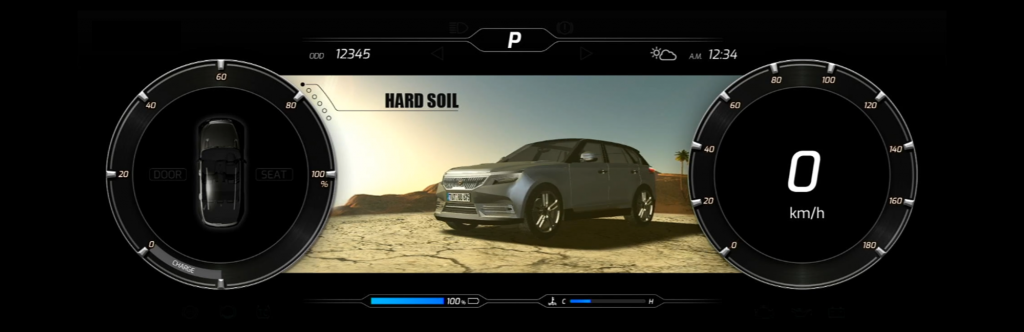
Usability is especially important for complex, large-scale HMI projects. On the one hand, because of the dimension of the project itself, but also due to the large teams working together. The latest improvements of CGI Studio, the 3.13 release, is perfect for such scenarios. Ranging from the new 64-bit scene composer going beyond memory confines to “Easy Mode UI”, for individual UI configurations for different user roles.


Large scale projects are the Champions League of HMI creation. The new 64-bit Scene Composer of CGI Studio 3.13 supports users who want to go beyond past memory confines. Automatic text size verification helps to fit texts into graphical confines, for example to speed up multi-language projects. Candera’s award-winning Smart Importer is improved by a unified import dialog for easy import of all the different types of files users can import. Add to this an all-new ‘Snap feature’ for dynamic lists, various new UI/UX enhancements, and an improved ‘Easy Mode’ of the user interface – and you are ready to play!


Want to test it yourself? Request your free trial of CGI Studio.


CGI Studio 3.13
Fig. 1: CGI Studio 3.13: Creating large-scale HMI projects – fast and easy.

64-bit Scene Composer

Large-scale HMI

Large-scale HMI projects can be challenging due to strict restrictions in memory and size. CGI Studio’s new 64-bit scene composer helps users to master big-sized projects by going beyond memory confines. It is also compatible with external 64-bit plug-ins for easy implementation of e.g. any kind of navigation solutions.


Text Size Verification
Text Size Verification

Aligning the length of pre-written texts with the space provided within the GUI can be a difficult, time- and resource-consuming process. CGI Studio now comes with an in-built, convenient report to proof that text size fits within graphical boundaries. Calculations are based on real rendering and provide layout information, for example on height and width of the text.


Smart Importer

Candera’s award-winning Smart importer gets better all the time. Long-time users of CGI Studio know that the Smart Importer imports graphics files directly into CGI Studio. During the import, its innovative AI detects industry-standard controls such as gauges, sliders, and buttons – and automatically adds their proper functionality.


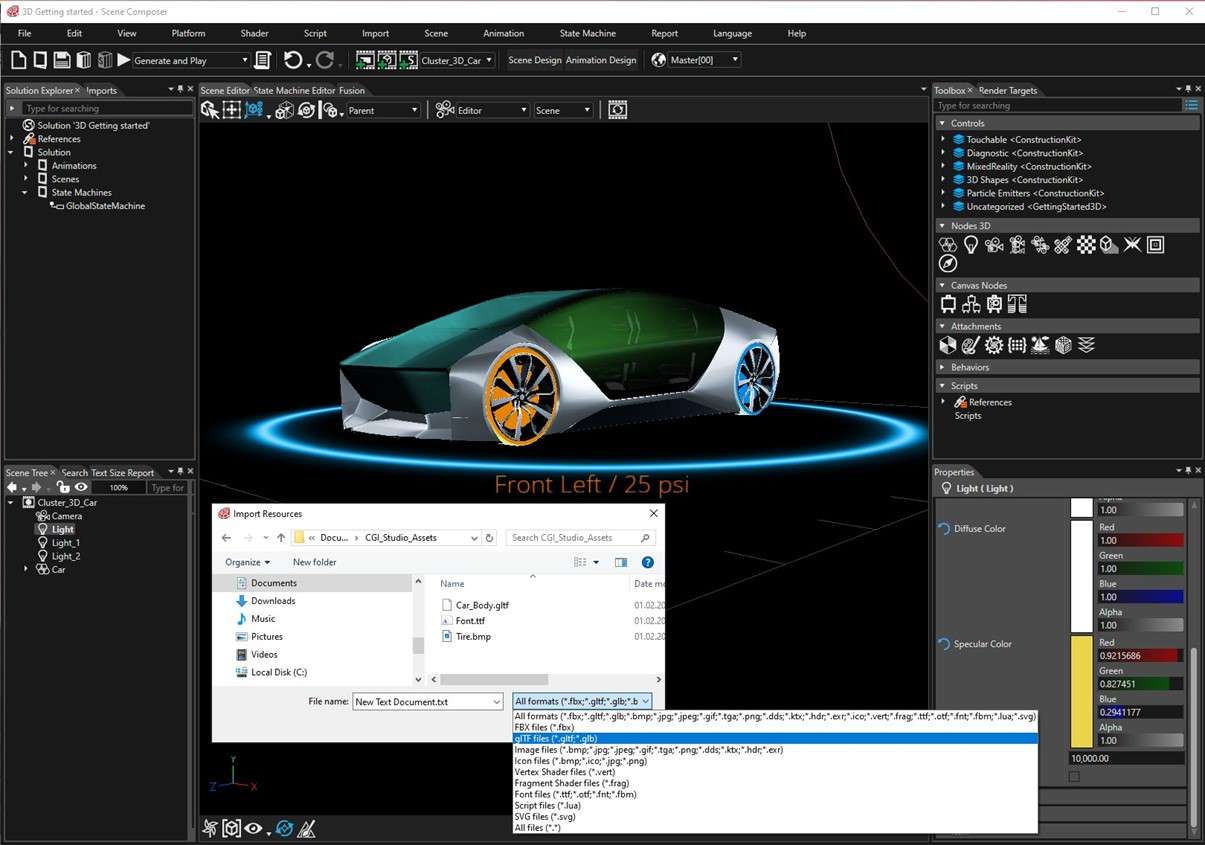
The latest version of the Smart Importer in CGI Studio 3.13 now includes a unified import dialog for different file types, so you can import your graphics file, be it from Adobe Photoshop®, Sketch, Axure RP, Figma or Adobe XD. The improved UI dialog helps you create your HMI faster by guided mapping. As does the Drag&Drop support for your glTF imports.
Candera’s Smart Importer

Fig. 2: Unified import into Candera’s Smart Importer in CGI Studio 3.13


Candera’s Smart Importer speeds up the whole HMI creation process by providing a direct preview, full re-import for quick design iterations, and image merging to reduce the memory footprint.


Extended Help System
Extended-Help-System

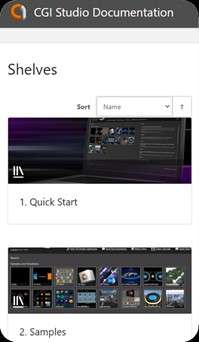
When you need help with your HMI project, you need it fast. The new dynamic in-page-search of CGI Studio 3.13 gives you the answers you need when you need them. This includes a history with forward and backward buttons as well as a simple and easy feedback option for each page. Check it out today and find regularly revised as well as interesting new articles and tutorials.


Easy Mode UI

It is always easier to find your way through known territory. Personalize the user interface of your CGI Studio Scene Composer to find your way faster and create your HMIs more effectively. Define the visibility of properties and default values or write protection in the way you need it. You can even create individual UI configurations for different user roles, which comes handy when coordinating big teams working on large-scale projects.


Dynamic List

Dynamic lists can be a hassle to navigate, especially when you’re trying to find a specific item. CGI Studio 3.13 has introduced a new feature that makes scrolling through lists a breeze. The snap function for list items improves touch interaction by stopping the list at the exact point you need it to, instead of somewhere slightly above or below. This feature ensures that you can find the item you’re looking for with ease.
Dynamic-List

Fig. 3: CGI Studio 3.13’s new snap function for better touch interaction


UX Improvements

The creation of your HMI can only be as fast as you can use your HMI tool. This is why CGI Studio 3.13 provides for better usability of toolbar, list, and text style editor. For example, an extended search panel, the state machine editor now supporting undo and redo, transition order, and state alignment for quick and intuitive HMI composition. But even more, Bird Eye, context menu, as well as a number of short cuts have been added to Fusion and State machine editors.

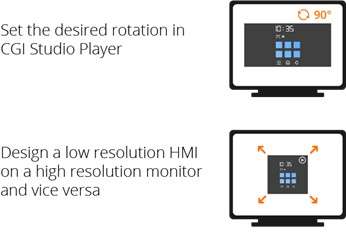
You can rotate and zoom your display preview for better overview. Also, support for long path names is now larger than 255 characters.


The Fusion editor, incidentally, is Candera’s latest feature for Intuitive visual composition of logic and behaviors. It is for users without any programming skills – making HMI creation more accessible for everyone.


Updated Monotype Libraries

CGI Studio 3.13 further comes with an update of the well-established Monotype Library: iType® font engine version 6.2.2 and WorldTypeShaper version 5 with Unicode 14 support.


Want to see for yourself?

Request a trial version of CGI Studio.


Learn more about CGI Studio: Website          Facebook          YouTube          Twitter          LinkedIn
 

CGI Studio Joined Renesas Partner Solution Program

CGI Studio Joined Renesas Partner Solution Program

Candera, a leading provider of HMI design tools, announces that it has become an official Renesas RZ ecosystem partner. The partnership program supports the joint promotion of Candera’s HMI design tool CGI Studio as a powerful resource for creating HMIs with Renesas’ RZ/G2L, RZ/G2LC, and RZ/V2L MPUs.


Candera GmbH, a leading HMI tool provider and development partner for worldwide automotive and industrial customers, is joining the Renesas RZ Partner Program to offer its Human Machine Interface (HMI) technology for long-lasting, demanding industrial applications to customers using the RZ/G2L, RZ/G2LC, and RZ/V2L MPUs.


The RZ Ecosystem Solution Program as part of the Renesas “RZ Ready” program brings global partners together to support customers in artificial intelligence, human machine interfaces (HMI) and industrial network applications. Each partner’s building block solution carries the “RZ Ready” badge and is designed to solve real-world customer problems.

CGI-Studio,RZ-ready
Fig. 1: CGI Studio is now officially “RZ ready”.


Renesas’ powerful RZ/G2LRZ/G2LCRZ/V2L  MPUs work seamlessly with Candera’s HMI tool CGI Studio to deliver first-class performance results not only for automotive, but also for industrial and consumer applications. The RZ/G2L group MPUs include an Arm® Cortex®-A55 (1.2 GHz) CPU, a 16-bit DDR3L / DDR4 interface, a 3D graphics engine with Arm Mali-G31 and video codec H.264 (RZ/G2L, RZV2L only)). It also has many interfaces such as camera input, display output, USB 2.0, and Gbit-Ether, making it ideal for any HMI application.


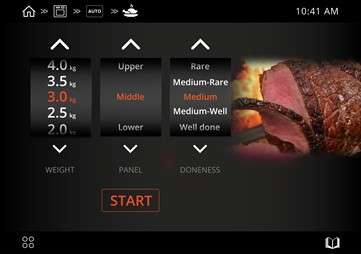
Two new demos powered by the HMI-enabled RZ/G2L

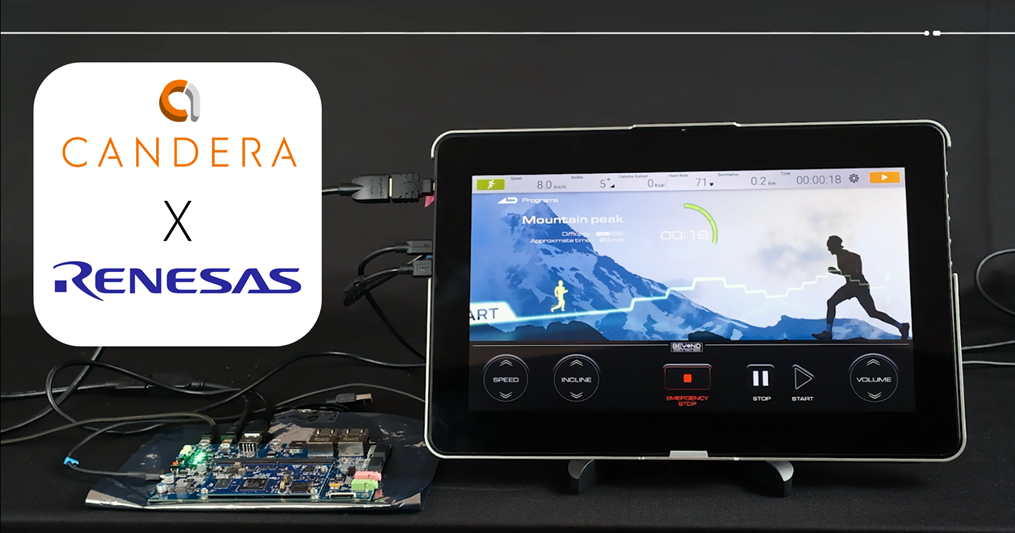
Renesas and Candera showcase the potential of their combined solutions with two first demos. One uses the example of an industrial steam convector oven, the other a treadmill, which runners might either have at home or find in their fitness studio. Both demos feature attractive graphics with 2D and 3D elements.


Want to see for yourself? Watch the demos running on RZ/G2L!

Candera-demo-“Treadmill”

Fig. 2: Candera demo “Treadmill” running on Renesas’ RZ/G2L


Voices from the partners

As a Renesas Partner Program member, Candera’s scalable and hardware-independent software solution CGI Studio for easy HMI creation will be promoted in the program. “We’re happy to welcome Candera in our RZ Partner Ecosystem Solutions Program,” said Mamoru Nomura, Senior Director, Embedded Computing Division at Renesas. “Candera brings years of experience in serving high-end automotive applications and we have collaborated on many automotive projects until now. Their expertise will help jump-start the development of HMI solutions tailored to industrial application needs.”


Reinhard Füricht, CEO of Candera, adds his views on the cooperation: “Our collaboration with Renesas goes back several years. We have been working with our partners at Renesas successfully on a number of projects”, says Reinhard. “We are happy to be part of the Renesas Partner Program community and are confident to be adding significant value to this excellent program. “


Long history of joint automotive projects
In the past, both companies had been mostly focusing on automotive projects. Candera presented an automotive cluster with advanced 3D effects during the 2022 Embedded World trade show in Nuremberg, Germany.

Embedded World

 Fig. 3: During Embedded World 2022, Candera presented their “Weather Cluster on a R-Car H3.


About Candera

Candera is a leading HMI tool provider and development partner for worldwide automotive and industrial customers. It supports its customers with the CGI Studio tool environment as well as provision of software services mainly in the areas of HMI development and embedded software. Candera GmbH in Linz, Austria and Candera America Inc. are part of KAGA FEI Co., Ltd. , situated in Yokohama / Japan.


Learn more about CGI Studio: Website          Facebook          YouTube          Twitter          LinkedIn

Not quite convinced yet? Request a free trial version of CGI Studio.

STMicroelectronics, IAR, and Candera unveil the future of “Smart Home” devices

STMicroelectronics, IAR, and Candera unveil the future of “Smart Home” devices

Geneva, Switzerland / Uppsala, Sweden – Leading technology companies Candera GmbH, IAR and STMicroelectronics have come together to showcase the exciting possibilities for the future of smart home devices. This collaboration highlights advancements in graphics, energy consumption management and high-performance capabilities, embodied by STMicroelectronics ‘ cutting-edge NeoChrom technology.


The collaboration will be released during a webinar on 21. November 2023. Register now!

With the growing demand for powerful yet cost-effective hardware coupled with user-friendly, visually captivating graphical user interfaces (GUIs), this alliance aims to offer a glimpse of the future of Smart Home White Goods. By harnessing the strengths of STMicroelectronics, Candera GmbH, and IAR, the trio will focus on exploring energy-efficient solutions and environmentally conscious approaches to home appliances. A standout feature of the collaboration is the introduction of “Guided Maintenance” in modern washing machines, supported by a more intuitive GUI. Uncover the limitless possibilities and competitive advantages offered by the STM32U599/5A9 with NeoChrom GPU, CGI Studio, and IAR Embedded Workbench in shaping the future of Smart Home technology.

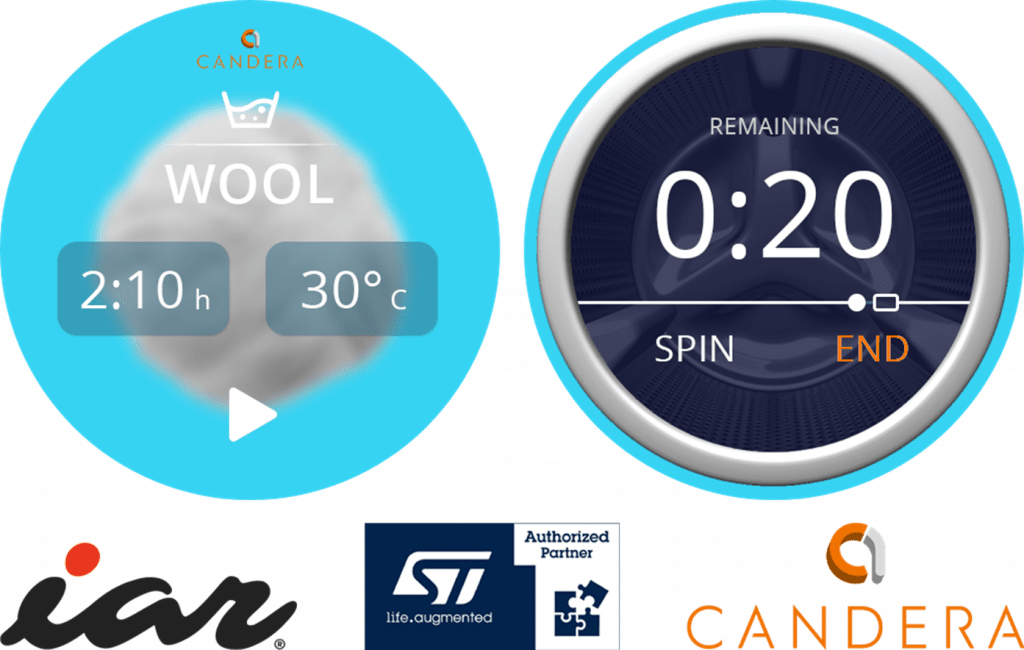
“Smart Home” washing machine

Fig. 1: The “Smart Home” washing machine GUI, presented by Candera and IAR, both long-standing ST Authorized Partners.


Candera GmbH, a leading provider of Human-Machine Interface (HMI) tools and development partner for worldwide automotive and industrial customers, is joined by IAR, the world leader in software and services for embedded development, and STMicroelectronics, a global semiconductor powerhouse. Together, they aim to deliver seamless user experiences and advanced energy consumption management. Both Candera and IAR are long-standing ST Authorized Partners.

“As developers and companies strive for greater efficiency in their application’s power consumption, solutions like IAR Embedded Workbench for Arm play a crucial role in enabling the next generation of ultra-low-power and ultra-efficient smart home devices,” says Anders Holmberg, CTO at IAR. “Our long-standing relationship with STMicroelectronics and Candera underscores our commitment to supporting feature-rich microcontrollers, including the STM32U5 series latest generation, ideally suited for the next generations of smart home appliances. Leveraging the capabilities of IAR Development Solutions with Candera’s professional HMI tools on the STM32U5 with NeoChrom graphic processing unit, we empower developers to deliver premium graphics combined with enhanced energy consumption management features.”

slick design of the Washing Machine

 Fig. 2: The fresh, slick design of the Washing Machine is presented on a 480×480 4” display


“Because many applications demand extra functionality, richer graphics, and faster performance while running longer, using a smaller battery, or employing energy harvesting, we’ve developed the STM32U5 and are extending the series, today,” said Ricardo De Sa Earp, Executive Vice President General-Purpose Microcontroller Sub-Group, STMicroelectronics. “This MCU combines the latest Arm core, our unique ultra-low-power technologies, generous on-chip memory, and the option of our NeoChrom graphics engine to elevate the user’s visual experience.”

“We are proud to be part of this project with our partners STMicroelectronics and IAR”, adds Reinhard Füricht, CEO of Candera, “it’s a great opportunity to showcase CGI Studio’s capabilities to provide high-end performance and brilliant HMIs on very specific hardware.”

The collaboration will be released during a webinar on 21. November 2023.

Register now!

Guided Maintenance

 Fig. 3: The demo features a “Guided Maintenance” part


For more information, please contact: Philip Privalov for Candera-related questions, Rafael Taubinger for any further information on IAR and Bertrand Denis for questions on STMicroelectronics and NeoChrom technology.


About Candera

Candera is a leading HMI tool provider and development partner for worldwide automotive and industrial customers. It supports its customers with the Candera Studio and CGI Studio tool environments as well as provision of software services mainly in the areas of HMI development and embedded software. Candera GmbH in Linz, Austria and Candera America Inc. are part of KAGA FEI Co., Ltd., situated in Yokohama / Japan. For more, go to www.candera.eu

About IAR

IAR provides world-leading software and services for embedded development, enabling companies worldwide to create secure and innovative products for today and tomorrow. Since 1983, IAR’s solutions have ensured quality, security, reliability, and efficiency in developing over one million embedded applications for companies across industries such as industrial automation, IoT, automotive and medical. IAR supports 15,000 devices from over 70 semiconductor partners. The company is headquartered in Uppsala, Sweden, and has sales and support offices worldwide. IAR is owned by I.A.R. Systems Group AB, listed on NASDAQ OMX Stockholm, Mid Cap (ticker symbol: IAR B). Learn more at www.iar.com.

About STMicroelectronics

At ST, we are over 50,000 creators and makers of semiconductor technologies mastering the semiconductor supply chain with state-of-the-art manufacturing facilities. An integrated device manufacturer, we work with more than 200,000 customers and thousands of partners to design and build products, solutions, and ecosystems that address their challenges and opportunities, and the need to support a more sustainable world. Our technologies enable smarter mobility, more efficient power and energy management, and the wide-scale deployment of the Internet of Things and connectivity. We are committed to achieving our goal to become carbon neutral on scope 1 and 2 and partially scope 3 by 2027. Further information can be found at www.st.com.

CGI Studio 3.12: Intelligent HMI creation

CGI Studio 3.12: Intelligent HMI creation

Intelligent solutions save time, money, and costly man hours of sought-after experts. This is true especially for complex projects such as in HMI creation. CGI Studio 3.12 features several intelligent solutions to everyday challenges in HMI creation, for example: The Fusion Editor, an enhanced Smart Importer with Figma import, an upgraded help system, a large set of 3D primitives, and support for vector graphics.


CGI Studio 3.12 highlights include: The new enhanced Smart Importer now supports the import of Figma files – while recognizing controls more precisely. With the new Fusion Editor users can visually compose their application logic. Support for Vector Graphics ensures more brilliant HMI graphics with lower memory footprint. An improved State Machine Editor comes with plenty of options to visually enrich your specification, and the Player allows for rotation and seamless scaling of GUIs in the making. The upgraded Help System now offers dynamic documentation incl. search and history as well as support for multiple languages – perfect for international teams, beginners and HMI Pros who want to further speed up their HMI game.


Want to see for yourself? Watch the CGI Studio 3.12 film!

A free trial of CGI Studio is also available.

Fig. 1: CGI Studio 3.12: High-performance HMI creation – the intelligent way.

Enhanced Smart Importer: Figma Cloud Import & better AI

The Smart Importer is Candera’s award-winning technology that lets users import graphics files directly into CGI Studio. During the import, its innovative AI detects industry standard controls such as gauges, sliders, and buttons – and automatically adds their proper functionality.

Significant improvements of the Smart Importer made this detecting process more precise and easier to use – for more accurate control mapping via AI.


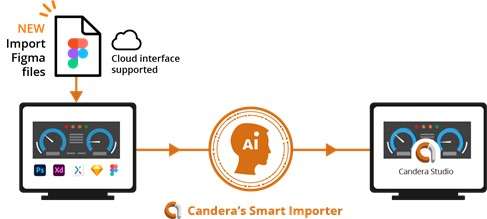
The Smart Importer has been supporting the import of graphics files from Adobe Photoshop®, Sketch, Axure RP, and Adobe XD for a while. The direct import of Figma files, including support of the cloud interface, is the latest addition to a growing list of supported tools.

Fig. 2: Figma import directly from the cloud in CGI Studio 3.12


Candera’s Smart Importer speeds up the whole HMI creation process by providing a direct preview, full re-import for quick design iterations, and image merging to reduce the memory footprint.


Fusion Editor: Visual Composition of Logic

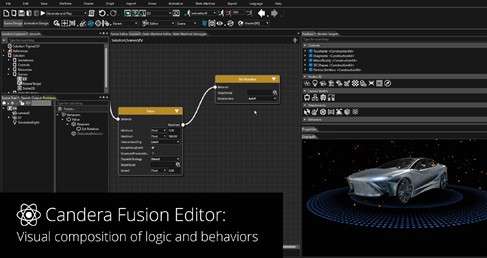
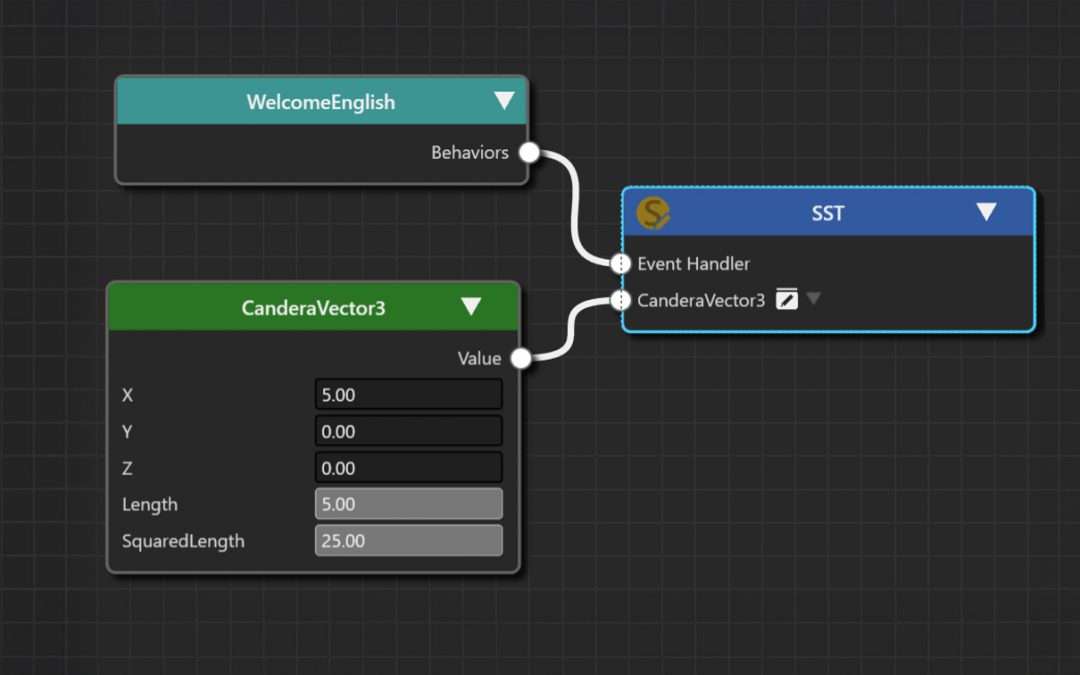
 In the 3.12 release, Candera has introduced the Fusion Editor in CGI Studio for the first time. The Fusion Editor allows users to easily compose the application logic in a graphical manner and combine it with the user interface. This feature is aimed at users without any programming skills and is intended to make HMI creation more accessible for everyone.

Fig. 3: Fusion Editor: Visual composition of logic and behaviors.


Support for Vector Graphics: Go Big!

There are many advantages to vector graphics: Their scalability, their small file size even when scaled very large, that they are easy to edit, load, modify, and duplicate.

In CGI Studio 3.12, vector graphics can now be used in HMIs – for creating even more brilliant Graphical User Interfaces. Users can simply import SVG files into the Scene Composer and use them as they would any other graphics file.


State Machine Editor: Design your Specification

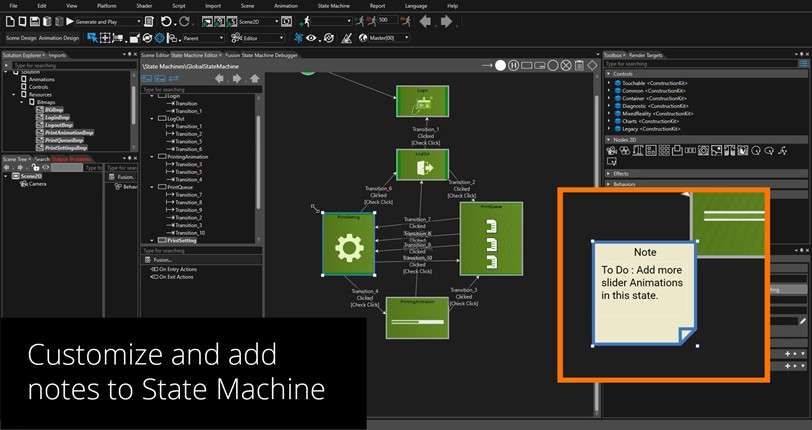
Significant improvements in CGI Studio 3.12’s State Machine now allow for users to design their screen transition specifications with flexible use of screenshots, custom images, colors, or even annotations. Elements of the state machine have become “designable”, so users can design their state flows according to their needs. For better overview, more efficient HMI creation and in the end: Faster time to market.

Fig. 4: State Machine Editor: Individually designable state machine for better overview.


State Machine Editor – NEW: Pseudostates
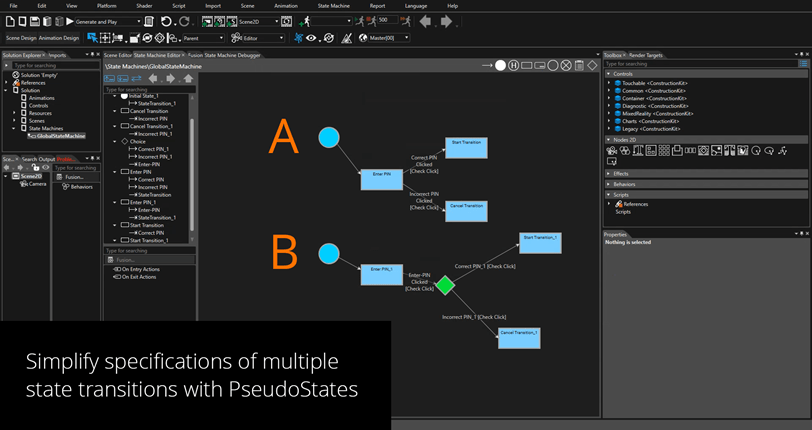
The improved state machine Editor of CGI Studio 3.12 now also gives users the option to work with pseudostates. A pseudostate is used to simplify specifications of multiple state transitions. It combines and encompasses multiple direct transitions like forks.

   Fig. 5: A) state machine with two transitions vs. B) state machine with two transitions WITH pseudostate.


CGI Studio Player: Rotate and Zoom

Speaking of ‘What You See Is What You Get’: CGI Studio’s Player lets users view their HMI right away. With the latest upgrade, it is now also possible to fit one’s HMI simulation to one’s screen while rotating it any way one needs – as well as scaling it to any size necessary. HMI simulation has never been more comfortable.

Fig. 6: CGI Studio Player: Easy rotation and zoom.


Upgraded Help System: Dynamic – and in your language

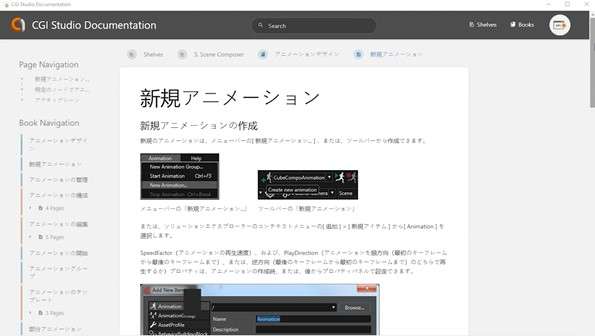
A clearly structured, extensive help system is the basis for fast on-boarding and overall effective use of any design tool. In CGI Studio 3.12, a new dynamic documentation including search & history get users to their answers faster. Also, a new look & feel with images and multimedia content makes looking for answers more effective and enjoyable. Lastly, the updated help system provides support for multiple languages.

Fig. 7: Help & Documentation: Answers to any question, here in Japanese.


Further improvements include an extended set of 3D Primitives for users to quickly draft their 3D scene.
The Extended Android support now includes features such as runtime resource overlay (RRO), virtual display support and revised touch & keyboard input.

Fig. 8: CGI Studio 3.12 provides a large number of 3D Primitives.


For more, watch the CGI Studio 3.12 Highlights video.


Not quite convinced yet?

Request a trial version of CGI Studio.


Learn more about CGI Studio: Website          Facebook          YouTube          Twitter          LinkedIn
 

Candera Studio Feature Pack 2

Candera Studio Feature Pack 2

Candera Studio: Introducing Fusion Editor’s “Super Sets”

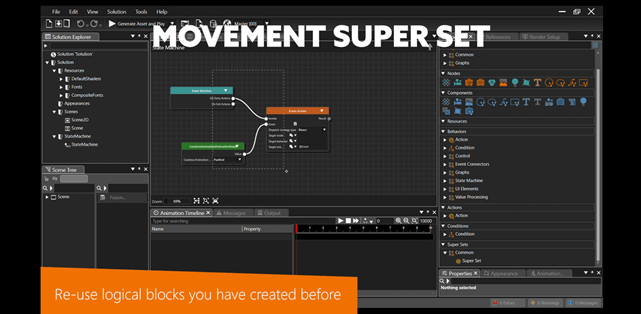
Super Sets are templates for logic blocks, which significantly speed up and simplify the HMI creation process: Users are now able to re-use blocks of logic, that they created for specific needs of their HMI. But that is not all: Candera Studio’s Feature Pack 2 comes with improvements of the state machine, “smart render” state caching to accelerate render performance, and advances in both the data source editor and font engine.


Candera Studio is the new HMI creation software for industrial, medical, and white goods industries, as well as other advanced embedded or individual HMIs. Easily accessible, intuitive to use – even for users without any coding experience – Candera Studio accepts any input (graphical files) and is set up to output to any embedded hardware on which user interfaces are displayed. Candera is opening to new users and new markets – highlighting Candera’s mission statement: “Candera is where Humans and Machines Interact: In displays of embedded devices.”


Now there is the first update. What is new about Candera Studio? Here is a sneak preview:


Fusion Editor’s “Super Sets”

Candera Studio’s Fusion Editor now includes a new feature called Super Sets. Users can easily merge complex logic into easy-to-use templates, share and re-use Super Sets within and across projects, and tailor the interface of Super Sets for high usability.


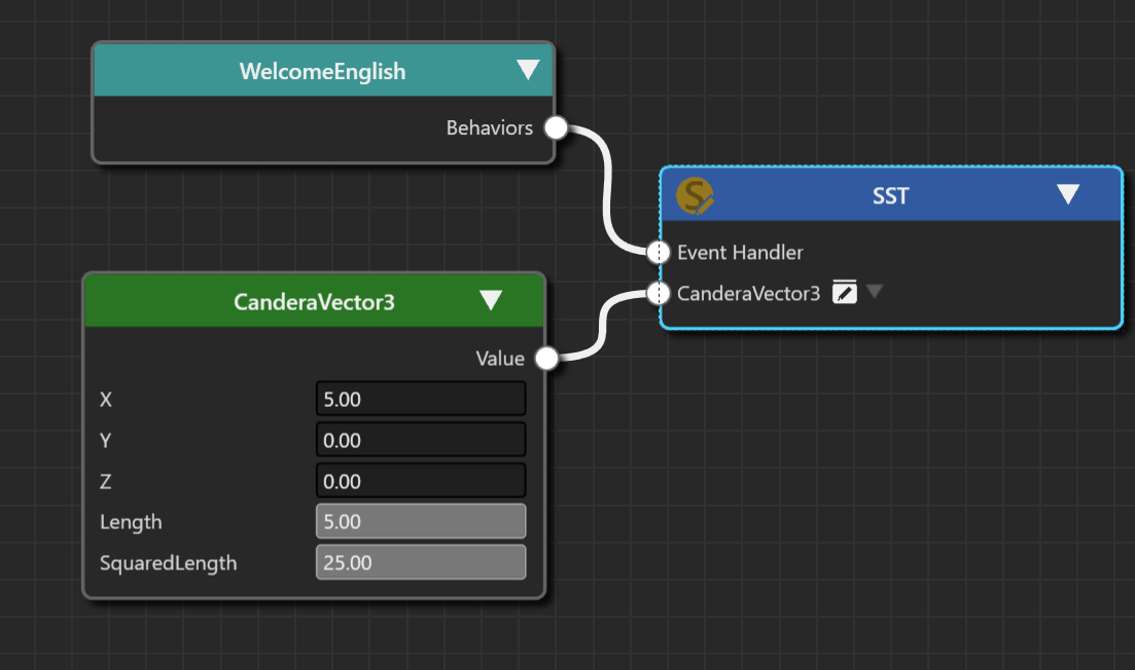
Fig. 1: Fusion Editor Super Sets: The template nodes are marked with the golden Super Set icon.

In short: combine custom Fusion diagrams in re-usable templates for simplified use. Once you have created one set of logic, it becomes much more efficient to re-use it for similar applications. For more, watch the Fusion Super Sets film.

Fig. 2: Fusion Editor Super Sets: Re-use logical blocks you have created before.

A free trial version is now available.

State Machine Improvements

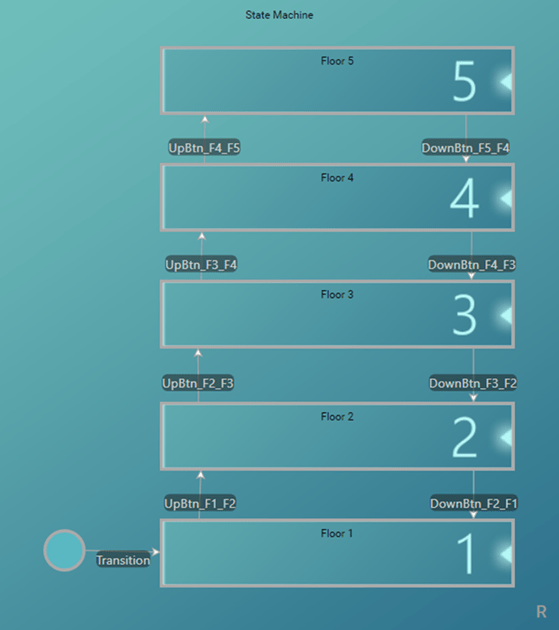
Candera Studio’s improved State Machine lets users design their screen transition specifications with flexible use of images, such as screenshots or snapshots, as well as annotations and individual coloring solutions.

Another step towards making the tool even more intuitive to work with: better integration of key-shortcuts or support for zoom levels.

Fig. 3: State Machine: more intuitive to use

Increased Rendering Performance

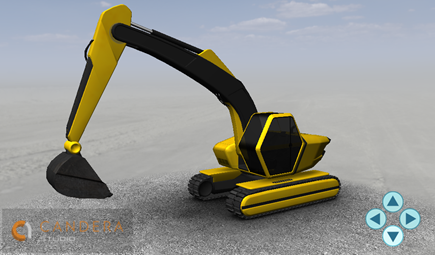
For Candera Studio’s Feature Pack 2, render performance has been optimized by smart render state caching to accelerate render performance. Users benefit from optimized render stability in conjunction with rendering of vector graphics

Fig. 4: Smart render state caching for accelerated render performance

Advanced Data Source Editor

Candera Studio’s Data Source Editor now supports a broad set of complex data types: Vector 2, Vector 3, Vector 4, Colour, Asynchronous List, and Rectangle. Additionally, support for global data items has been added to easily share data between multiple scenes


Monotype Font Engine

The professional Monotype font engine is fully integrated in Candera Studio and used to render fonts. Supporting shaping, the optimized 2D Basic Sample showcases high-quality Monotype fonts for a wide variety of use cases. Beyond improving visual appearance, the right choice of fonts can ensure safety requirements for HMIs in critical applications or ensure a globally uniform brand appearance across many languages.

Further improvements include a powerful dynamic list control (for more, watch the video), JavaScript samples, improved Adobe XD import for the Smart Importer, UI/UX optimizations for the Fusion Editor.


For those new to Candera Studio, a quick reminder:

Candera’s latest innovation is the HMI software toolchain Candera Studio – for industrial applications. It is an intuitive, noncoding HMI software tool – clearly “designed for designers”. For easy access, especially faster on-boarding, with multi-language documentation, and detailed tutorials.

Designed to be open: to be integrated “from any input” i.e., various graphics tools – “to any output” i.e., operating systems and hardware.
Presenting for the first time the Fusion Editor for intuitive visual composition of logic and behaviors: No coding skills necessary.

KAGA FEI Co., Ltd.

Candera Studio includes ready-to-use controls, automated workflows, integrated state machine and an AI-powered Smart Importer. It uses artificial intelligence to recognize relevant components such as buttons, sliders, gauges, etc., and suggests the appropriate function for each element. Simply select the appropriate component and define its property. Check the result immediately in a simulation of the Candera Studio Player. In a few minutes, you have created a fully functional HMI.


New: Watch the Candera Studio Best of video: https://youtu.be/l5kULSnEH-E


Not quite convinced yet?

Request a trial version of Candera Studio: https://canderastudio.com/en/trial/


Learn more about Candera Studio: Website          Facebook          YouTube          Twitter          LinkedIn
 

About Candera

Candera is a leading HMI tool provider and development partner for worldwide automotive and industrial customers. Candera supports its customers with the CGI Studio and Candera Studio tool environments, as well as provision of software services mainly in the areas of HMI development and embedded software. Candera GmbH in Linz, Austria and Candera Japan, are both part of KAGA FEI Co., Ltd. situated in Yokohama, Japan.